
The Interprefy Portal is a centralised hub for managing multilingual meetings and events using Interprefy services.
It allows you to manage your event sessions, monitor Interprefy Plan usage, configure multilingual meeting spaces, and manage user access — all from a single interface.
Whether you are organising internal meetings or large multilingual events, the Portal provides self-service tools to help manage your Interprefy environment and services more efficiently.
Key Capabilities
-
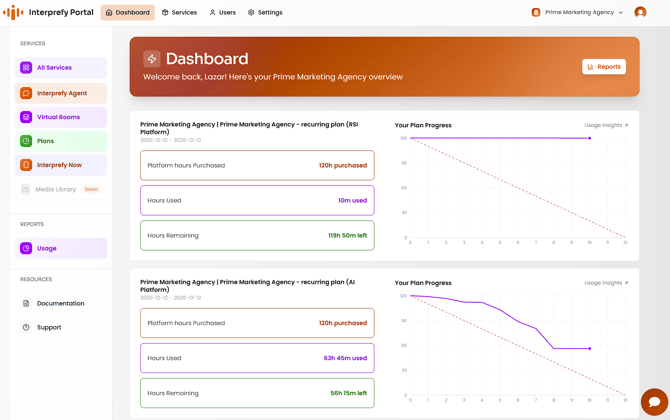
Real-Time Usage Tracking: Monitor your plan's "burn rate" with predictive velocity graphs to ensure your budget stays on track throughout the year.
-
Custom Virtual Rooms: Create dedicated spaces for online meetings and events where you can pre-define both spoken and translated languages.
-
Interprefy Now Rooms: Create and manage Interprefy Now rooms for instant, portable access to two-way AI Speech Translation and Captions for in-person and online meetings.
-
Interprefy Agent: Deploy the Interprefy Agent to bring real-time captions and interpretation for meetings on Microsoft Teams, Zoom, Google Meet, and Webex.
- Role-Based Management: Invite team members with specific permission levels, from "Members" to full "Admins".
Getting Started Guides
To help you get the most out of your experience, explore our detailed step-by-step guides below:
| Goal | Description |
| Create a Virtual Room | Learn how to set up your meeting space, configure language pairs, and retrieve access tokens for speakers and audiences. |
| Create an Interprefy Now Room | A guide to creating, managing and accessing Interprefy Now rooms, as a host or participant. |
| Set up an Interprefy Agent | A guide to setting up Interprefy Agents for seamless integration with your favourite conferencing platforms. |
| Manage Portal Users | Instructions on inviting colleagues, assigning roles, and auditing account access. |
| View Plan Usage | Understand how to analyse your consumption, view usage insights, and view contract details. |
Interprefy portal interface
-
To learn more about Interprefy Agent with your preferred platform, please visit our guides for: Microsoft Teams, Zoom, Webex and Google Meet.
-
To learn more about Interprefy Now, please visit our user guide.