
Keeping track of your usage is essential for budget management and ensuring your upcoming events are fully covered. The Interprefy Portal provides a comprehensive dashboard to monitor your "burn rate" and dive deep into specific usage data.
Follow these steps to manage your Plans effectively:
1. Access Your Usage Overview
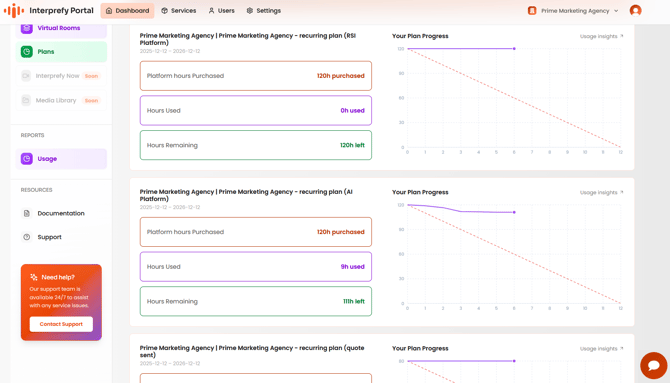
Log in to the Interprefy Portal and select Dashboard from the main menu. This top-level view gives you an instant snapshot of your account health for each Interprefy Plan, including:
-
Platform Hours Purchased: Your total starting balance.
-
Hours Used: The total time consumed by your events to date.
-
Hours Remaining: Exactly how much time you have left on your current Plan(s).
2. Analyse the Velocity Graph
The Velocity Graph is a predictive tool designed to visualize your consumption over the 12-month duration of your plan.
-
The Purple Trend Line: This shows your actual month-to-month remaining hours.
-
The Red Dotted Line: This represents the average burndown rate.
-
Staying on Track: If your remaining hours is significantly below the red line, you may be on track to run out of hours early and might need to purchase additional time. If it’s above the red dotted line, you have room to scale up your events.
3. Deep Dive with Usage Insights
To see exactly where your hours are going, click "Usage Insights" located next to each graph.
-
This section breaks down usage by Virtual Rooms and Agents associated with that specific plan.
-
Detailed View: You can click on any individual room or agent to see a granular breakdown of its specific sessions, timestamps, and total hours consumed.
4. Manage Your Plan Details
For a more administrative view, click the "Plans" option in the left-hand navigation menu. From this screen, you can manage the "big picture" of your contracts:
-
Plan Contract Details: Review your official start and expiration dates.
-
Associated Assets: View all Virtual Rooms or Agents currently linked to that specific plan.
-
Status Tracking: Monitor the lifecycle of each plan in your portfolio.