
By incorporating Interprefy’s live multilingual solutions, you can connect people through your regular meeting platform — without communication barriers. Run more inclusive, accessible, and impactful meetings that reach wider audiences — enabling participants to fully collaborate while speaking their native language.
Interprefy multilingual solutions for Cvent events
To create a more engaging, inclusive, and impactful experience, Interprefy enhances your Cvent events with live translation and interpretation services:
Remote Simultaneous Interpretation
Interpreters provide simultaneous interpretation from the Interprefy platform to your meeting and relay the original speech into another language, in real-time. Meeting participants simply select their preferred audio language.
Live Closed Captions & Subtitles
Participants receive real-time captions or subtitles in their selected language, allowing them to read what’s being said. Interprefy Captions provide clearer understanding for participants who are hard of hearing, joining from noisy environments, or following in their second language.
AI speech translation
This solution allows you to add live speech translation powered by Interprefy AI to any meeting or event. This approach is highly flexible, allowing meeting organisers to add languages even at the last minute. Meeting participants simply select their preferred language and listen to live AI speech translation.
Media Services
After your event, we can turn your sessions into professionally edited recordings — complete with translated audio, subtitles, and transcripts in all languages. So your content keeps working long after the live event is over.
How to use Interprefy with Cvent
Choose how attendees access Interprefy services based on your event format and requirements:
- Directly within Cvent using the Interprefy widget embedded in the Cvent session interface, providing access to interpreted or AI-translated audio and captions in real time.
- Through the Interprefy Mobile or Web App, providing flexible access to interpreted or AI-translated audio and captions across different event formats, using a browser or a mobile device.
Your Interprefy team can help you select the most suitable option for your event setup.
How it works for event organisers and administrators
To provide Interprefy services, your event content is streamed to the Interprefy platform for Remote Simultaneous Interpretation, AI Speech Translation and/or Captions. The connection between your event and the Interprefy platform is set up and monitored by our Remote Support team.
Request Interprefy services for your upcoming multilingual event on Cvent. Once your event has been scheduled, your Interprefy team will provide the required access details. If the Interprefy widget is used for your event, you will receive a widget code to add to your Cvent event.
You will also receive an event link, token and QR code to share with your attendees accessing Interprefy services through the Interprefy Mobile App or Web App.
Please confirm the required setup with your Interprefy team before the event.
How to add the Interprefy widget to your Cvent event
Step-by-step guide:
-
In Cvent, go to Events and select the event you want to add Interprefy widget to.
- Navigate to Attendee Hub in the side-menu, and choose Website and App, then click Manage website and app.
- In the side-menu, navigate to Features and choose Session Content, then click on Manage button within Code Widgets.
- Click on Create code widget button, enter the name "Interprefy" and choose an icon for the widget.
- Select a session where the widget will be displayed, then click Add code button.
- In the code window, paste the widget code provided by your Interprefy team, then click Add code to confirm.
How to add Interprefy access link in the session description
- In Cvent, go to Events, select your event and navigate to Agenda, and select Session List.
- In the Session List, select your session and click Edit.
- Navigate to Description field, and click on the Link icon in the bar, choose the link text and paste the Interprefy audience link provided in the URL.
- Click Apply.
How do attendees access Interprefy services on Cvent events
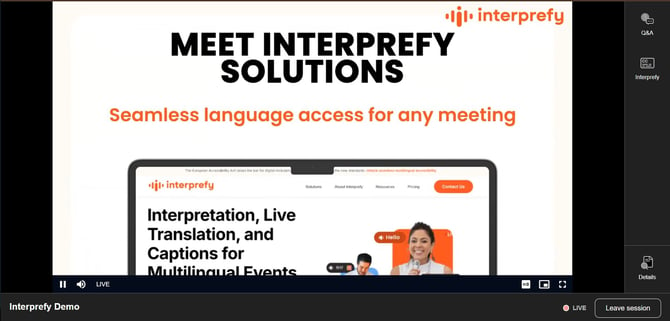
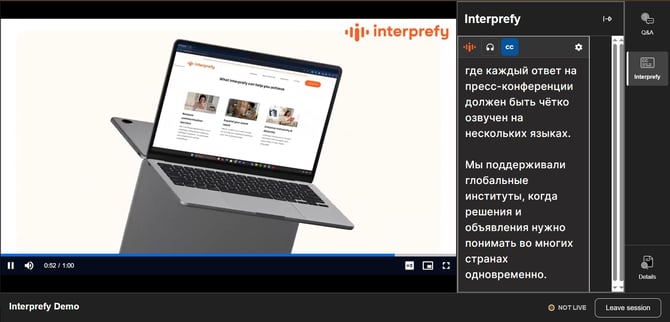
Access through Interprefy widget on Cvent event interface
Once the Interprefy widget has been added to your Cvent session, attendees can access live Remote Simultaneous Interpretation, AI Speech Translation and Captions directly from the Cvent interface.
- Open the session in Cvent.
- Click the Interprefy icon.
- Select the preferred audio and/or caption language.
-
All spoken content will be delivered in the language selected by the attendee.
-
To listen only to the interpretation or translation, attendees can mute the original audio on the video player — while all visual content remains visible on the event interface.
Access through the Interprefy Mobile or Web App
On your multilingual events supported by Interprefy, attendees can easily access live Remote Simultaneous Interpretation, AI Speech Translation, and/or Captions through the Interprefy Mobile or Web app.
- Interprefy Mobile App - Attendees download the Interprefy app from the App Store or Google Play, scan the QR code or enter the event token, and select their preferred language.
- Interprefy Web App - Attendees open the event link in their browser or enter the event token manually, and then select their preferred language.
- Event link, QR code or event token is shared by the event organiser.
- We recommend using Google Chrome or Microsoft Edge browsers to access Interprefy Web App.
- To access Interprefy Web App click here.
To learn more about Interprefy Mobile App visit our step-by-step guide.
To learn more about Interprefy Web App visit our step-by-step guide.
- Professional interpreters and AI language services - Combine Remote Simultaneous Interpretation, AI Speech Translation and Captions based on your event requirements.
- Integrated and flexible attendee access - Attendees can access interpreted or AI-translated audio and captions directly from the Cvent session interface using the Interprefy widget, or through the Interprefy Mobile App or Web App using a browser or mobile device.
- AI Speech Translation and Captioning in 80+ languages
- Custom Vocabulary Integration - Predefine specific terminology, such as brand names, technical jargon, or domain-specific language — significantly improving caption reliability in sectors with precise or industry-specific terminology.
- Event planning and coordination - Interprefy project managers support your event from planning to delivery, coordinating the multilingual setup and helping ensure everything is ready for a successful event.
- Technical support - The Interprefy Remote Support team assists with setup and monitors live translation and interpretation services during the event.
- Multilingual recording - Option to record your meeting or event, including interpreted and/or AI-translated audio, closed captions, and transcripts.
Ready to make your next Cvent event multilingual?
Your Interprefy team is there to help you choose the right setup, get it running smoothly, and support you all the way through.